Work
At least 50% off from FlexSub
Subscribe Now
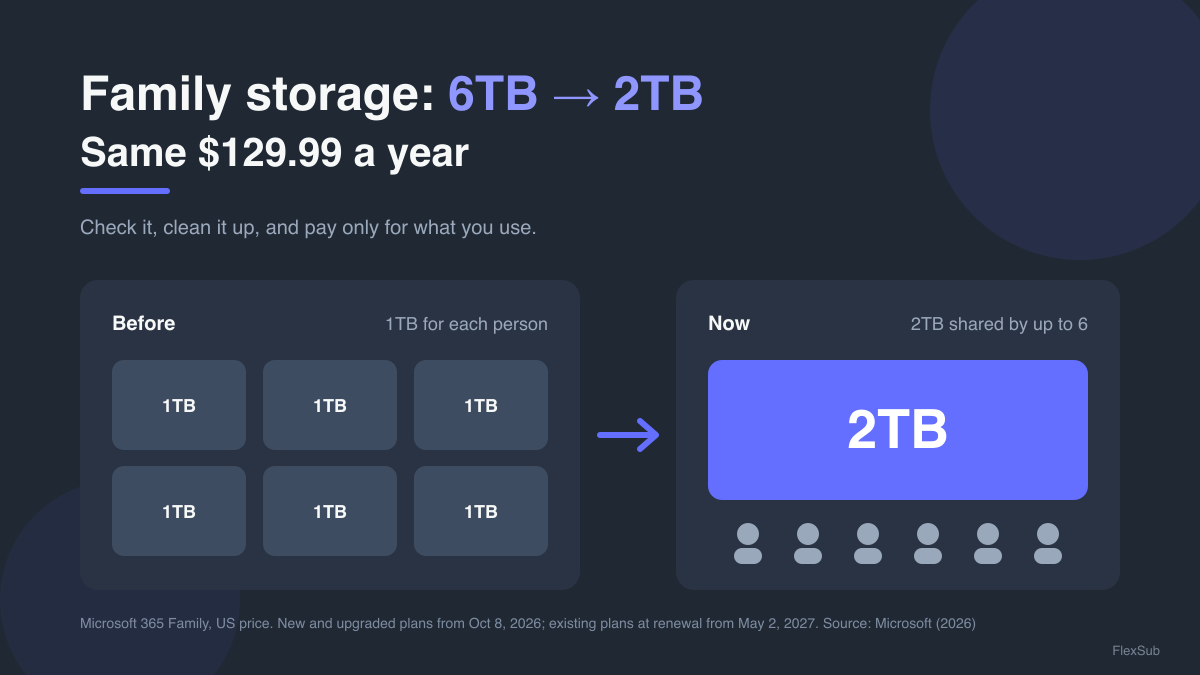
6TB down to 2TB. Same price.
That's the new deal for Microsoft 365 Family and Premium. Until this month, each of up to six people on a Family plan got their own 1TB of OneDrive storage. From October 8, 2026, new and upgraded Family and Premium subscriptions get one 2TB pool that everyone shares instead, according to Microsoft's own support page.
If you already pay for Family, you're not affected yet. Microsoft says existing plans switch to shared storage when they renew on or after May 2, 2027. That gives you a few months to check whether 2TB is enough for your household, and to make sure you're on the right plan at the right price before it hits.
Here's the good news: for most families this is fixable in an afternoon, and some of you could end up paying less than you do today.
The 60-second version:
- Add up everyone's OneDrive usage now, while there's time to act.
- Don't upgrade to Premium by accident. It switches you to the 2TB pool straight away.
- If you don't use Copilot, look for the cheaper "Classic" option before you renew.
- Clear out the duplicate photos and the recycle bin that quietly eat your space.
- Match your plan and its length to how your household really works.
Here's how to do each one.
Your plan just lost two-thirds of its space
In the US, Microsoft 365 Family still costs $12.99 a month or $129.99 a year on Microsoft's website, and Premium is $19.99 a month or $199.99 a year (prices checked this week). Personal stays at $9.99 a month with its own 1TB, and Microsoft's support page says the single-user Basic and Personal plans aren't changing.
What changes is what the money buys. A full Family plan used to come with up to 6TB in total. Now it's 2TB, shared across up to six people. Each person's files stay private unless they share them, but the space is one pot.
Do the maths and the cost of storage has tripled: $129.99 for 6TB works out at about $21.67 per terabyte a year. For 2TB, it's about $65.
If your household uses a few hundred gigabytes between you, you won't notice a thing. If someone in the family backs up every photo and video from their phone, you might.
The 2-minute check every member should do this week
Microsoft says you won't lose access the moment you go over. You'll get warnings as you approach 2TB, and if you go over, you can keep accessing your files for up to a year while you free up space, buy more storage or upgrade. That's a safety net, not a plan.
So do the check now:
- Ask each member to look at their OneDrive usage in their Microsoft account.
- Add the numbers up and compare the total with 2TB.
- Find your renewal date. That's the day the change actually reaches you, if it's on or after May 2, 2027.
If the total is comfortably under 2TB, you're done. If it's close or over, keep reading.
The upgrade that backfires
Here's the trap. Microsoft's support page says upgrading before May 2, 2027 moves you to the shared model sooner. Downgrading doesn't.
So if you're tempted by Premium for its extra AI features, know what you're signing up for. In the US, it's $70 a year more than Family, and it brings the 2TB pool into your home straight away rather than at your 2027 renewal. If your family is already over 2TB, wait until you've cleaned up.
Paying extra for an AI you never open?
This is where the real saving can be. When Microsoft added its Copilot AI to Personal and Family plans, starting in late 2024, subscribers were moved to a higher price at renewal. In Australia, the consumer regulator, the ACCC, said in October 2025 that Personal went from A$109 to A$159 a year and Family from A$139 to A$179, affecting about 2.7 million subscribers.
There was a cheaper option: "Classic" plans with the old features and no Copilot, at the old price. The ACCC alleges that Microsoft's emails didn't mention them, and that the only way to find one was to start cancelling. That case is before the Federal Court. In the UK, the Competition and Markets Authority opened its own investigation in July 2026 and has reached no conclusions. Its notice put the difference between Family and Family Classic at £25 a year (£104.99 vs £79.99).
What to do today: if you never use Copilot, go to your subscriptions in your Microsoft account before your next renewal and see what you're offered. The UK regulator described the Classic switch as time-limited, so it may not appear for everyone. If it does, that's money back for features you weren't using.
Free up space without deleting a single memory
Before you pay for more storage, find out what's actually filling it. Two quick wins that tech site gHacks points to in its October 2026 guide:
- Duplicate photo backups. If two phones back up the same family photos, or one person's camera roll has been uploaded twice, you're paying to store the same picture again.
- The OneDrive recycle bin. Deleted files still count toward your quota until the bin is emptied.
Then look for the big stuff: old videos, forgotten folders from a past job, and installer files nobody needs. Clearing a few hundred gigabytes is often enough to get comfortably under 2TB.
Don't pay the sticker price
Last step: make sure the plan itself still fits.
- Count the people. Two people on two Personal plans pay $199.98 a year in the US. One Family plan is $129.99 and still gives you 2TB to share.
- Think about the length. Paying yearly is cheaper than monthly on Microsoft's own pricing ($129.99 vs $155.88 for 12 months of Family), so only stay monthly if you might switch.
- Compare sellers. FlexSub offers discounted plans for Office 365 and other work and productivity tools, in lengths from 27 days up to 12 months.
Microsoft has shrunk what your money buys. That doesn't mean you have to pay the same for it. Check your storage, skip the accidental upgrade, ask about Classic, clean out the duplicates, and you'll walk into your 2027 renewal paying for exactly what you use, and not a gigabyte more.
Reviewing your work and productivity tools this month? Browse FlexSub's work plans and see where you could pay less for the apps you use every day.
Work
At least 50% off from FlexSub
Better, flexible and cheaper subscriptions for a wide range of services in just a click of a button.
Get started now